
About Racing Master
Racing Master is a simulation-style mobile racing game from NetEase Games, developed together with Codemasters. It features realistic graphics, a collection of licensed cars from well-known manufacturers and competitive races against other players. It’s a good fit if you like collecting dream cars, tuning their performance and going head to head on the track. Gems are Racing Master’s premium currency, used to buy cars, parts and customization items. On ItemGame, you can top up Gems with just your User ID and server choice, no account login needed.
What You Can Buy
Racing Master products on ItemGame are Gems packs with the bonus already included in each amount:
- 70 + 4 Gems
- 140 + 7 Gems
- 210 + 11 Gems
- 350 + 18 Gems
- 700 + 35 Gems
- 1000 + 50 Gems
- 1400 + 70 Gems
- 2100 + 105 Gems
- 3400 + 170 Gems
- 6600 + 330 Gems
The first number is the main Gems amount and the second is the bonus that arrives in the same transaction. You can use Gems to buy cars in the showroom, upgrade parts or pick up cosmetic items such as paint and rims for your garage.
How to Top Up Racing Master on ItemGame
- Enter your Racing Master User ID in the field provided.
- Select the Server from the dropdown. The RacingMaster server is currently available.
- Choose the Gems amount you want, pick a payment method, such as QRIS, e-wallets (DANA, OVO, ShopeePay, LinkAja), a bank virtual account or cash at Alfamart or Indomaret, and complete the payment following the instructions.
- Once the payment is confirmed, the Gems are processed automatically and delivered to your account. Check your Gems balance in the game.
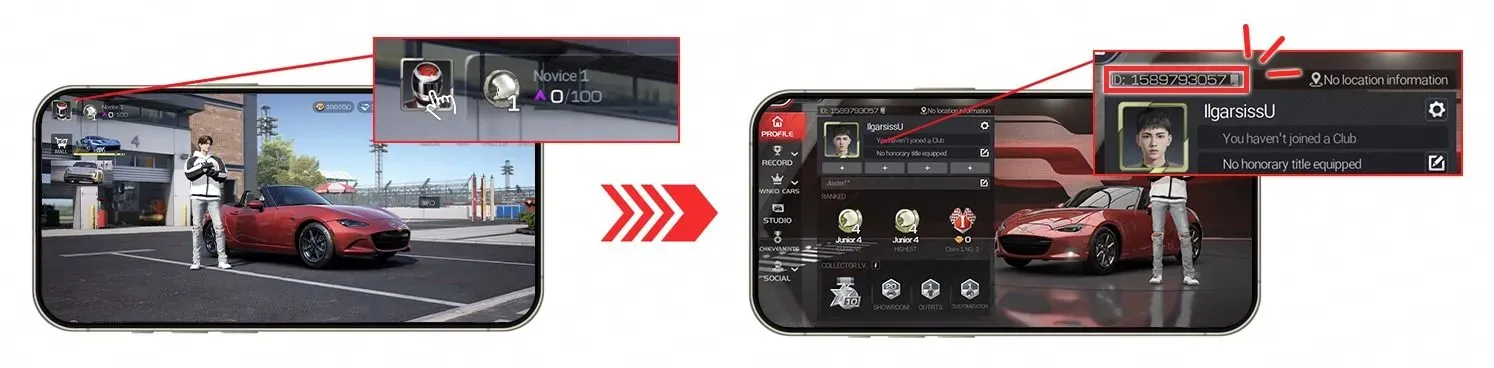
How to Find Your User ID
- Open Racing Master and go to the main screen.
- Tap your avatar or profile icon in the top-left corner.
- Your User ID is shown on the profile page, usually at the top near your character name.
- Copy the number into the User ID field on ItemGame, then select the matching server.
Tips
- Double-check your User ID before paying. Gems sent to another account can’t be pulled back.
- Pick an amount that fits your target, such as the car or parts you’re saving for, so you don’t need to top up twice.
- Make sure the server you select matches the server your account plays on.
- Keep your invoice number until the Gems show up in your account.
- If your Gems haven’t arrived after a few minutes, check the invoice page, then contact ItemGame support with your invoice number.
Racing Master top-ups on ItemGame run automatically 24/7, so you can get back on the track without a long wait.
Why Top Up at ItemGame
- Automatic Process
- No Password Needed
- Local Payments
- Customer Support
How to find your Racing Master User ID for a top-up on ItemGame:
- Open Racing Master and wait until you reach the main garage screen.
- Tap your avatar or profile icon in the top-left corner of the screen.
- On the profile page, your User ID is shown at the top near your character name.
- Copy the User ID into the User ID field on ItemGame.
- Select the server that matches your account from the Server dropdown.
Enter the User ID without spaces or extra characters, and check it again before you continue to payment. Gems sent to the wrong account can’t be moved, so take a moment to make sure your details are right.
Racing Master FAQ
1 Where can I find my Racing Master User ID?
2 Which server should I select?
3 How long does it take for Gems to arrive after payment?
4 My Gems haven't arrived. What should I do?
5 What if I entered the wrong User ID?
6 Do I need to log in or give my password?
7 Which payment methods are available?
Order Form Racing Master
Buyer reviews
- Ra***a Verified buyer
Terbaik, topup langsung masuk