Top Up Speed Drifters Diamonds by User ID
Speed Drifters, Action-Packed Arcade Drift Racing
Speed Drifters is an arcade mobile racing game from Garena that puts drifting skill, nitro use and racing with friends front and centre. There’s Speed Race mode for pure speed contests and the more chaotic Item Race with all kinds of disruptive items, plus cars you can modify and a wide variety of character outfits. This page is for topping up Speed Drifters Diamonds quickly using just your User ID, with no login required.
What You Can Buy
Diamonds are the premium currency in Speed Drifters, used to buy new race cars, outfits, accessories and other premium items in the in-game shop. Amounts available on ItemGame:
- 56 Diamonds
- 112 Diamonds
- 282 Diamonds
- 579 Diamonds
- 1230 Diamonds
- 1845 Diamonds
- 3134 Diamonds
Pick the amount that matches the car or outfit you have your eye on. Diamonds also come in handy during themed or collaboration events, when limited-edition cars and outfits appear in the shop for a short time.
How to Top Up Speed Drifters on ItemGame
- Choose the Diamonds amount you need.
- Enter your Speed Drifters User ID in the field provided.
- Choose a payment method, such as QRIS, e-wallets, bank virtual account or cash at Alfamart or Indomaret.
- Complete the payment. Once it’s confirmed, the Diamonds are processed automatically to your account.
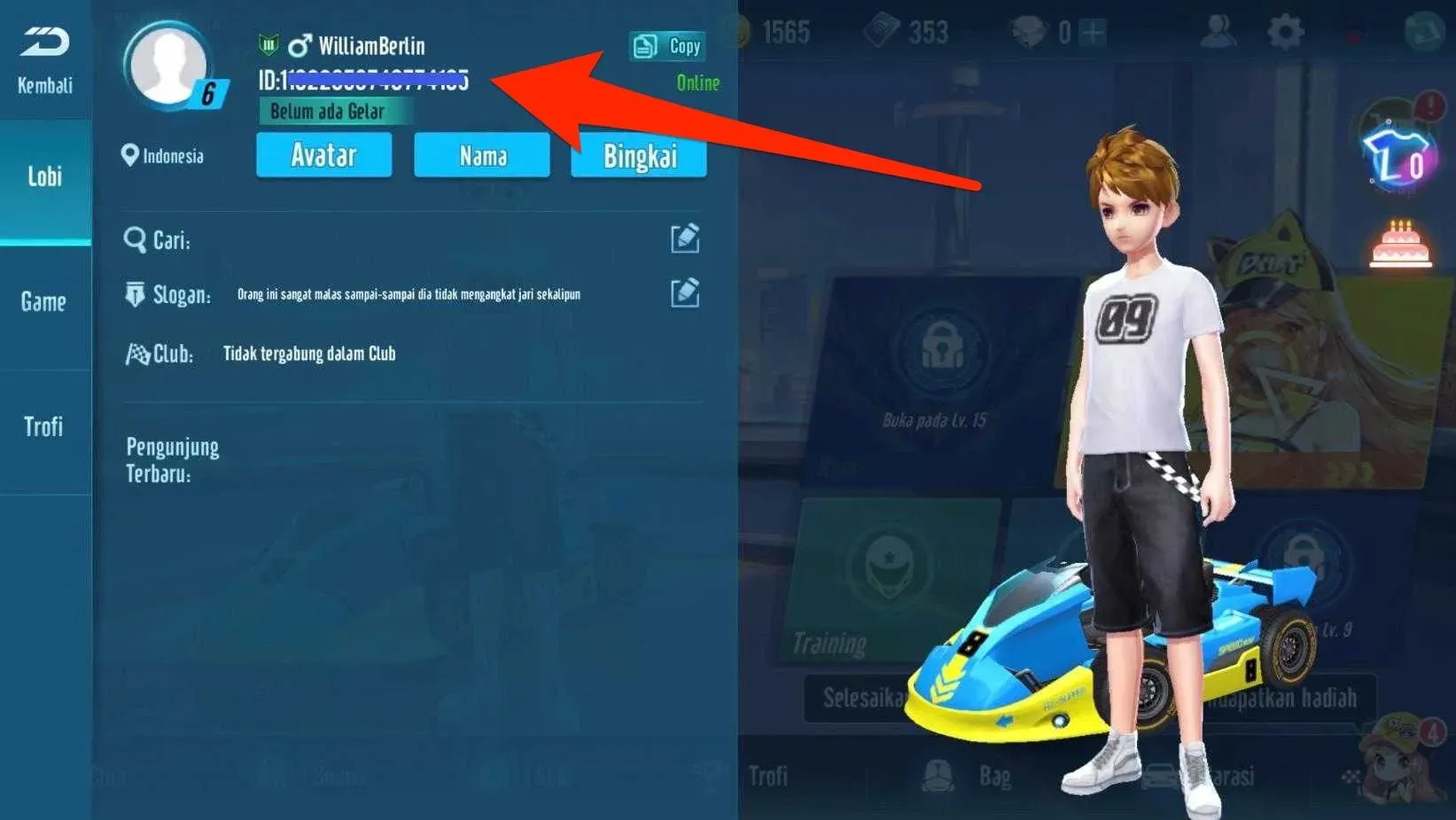
How to Find Your User ID
- Open Speed Drifters and go to the main lobby.
- Tap the Settings icon (the gear) in the top right corner of the screen.
- Open the General tab; your player ID is shown there.
- Copy the number, then paste it into the User ID field on ItemGame.
Tips
- Check your User ID twice before paying; Diamonds sent to another account can’t be pulled back.
- Pick an amount that fits your goal, for example a specific car, so you don’t come up short.
- Keep your invoice number until the Diamonds show up in your balance.
- If your Diamonds haven’t arrived after the payment is confirmed, check your transaction history on ItemGame, then contact support with your invoice number.
- Restart the game if your balance hasn’t updated after a few minutes.
Speed Drifters Diamond top-ups on ItemGame run automatically 24/7, so you can top up whenever you like before your next race.
Why Top Up at ItemGame
- Automatic Process
- No Password Needed
- Local Payments
- Customer Support
How to find your Speed Drifters User ID:
- Open Speed Drifters and wait until you reach the main lobby.
- Tap the Settings icon (the gear) in the top right corner of the screen.
- Open the General tab; your player ID is shown there. Copy the number carefully.
- Paste the ID into the User ID field on the ItemGame top-up page.
Make sure the ID you enter belongs to the account you want to top up. If you have more than one Garena account, make sure the one you’re logged in to is the account you want to top up. Diamonds added to another account can’t be moved.