Top Up New State Mobile NC by User ID
About New State Mobile
New State Mobile, formerly known as PUBG: New State, is a battle royale game from KRAFTON, the creator of PUBG. Set in the year 2051, it drops you onto a futuristic battlefield with customisable weapons, modern vehicles and a more interactive environment than a typical battle royale. The goal is still the same: survive until you’re the last one standing. This page is for New State Mobile players who want to add NC to their account quickly.
What You Can Buy
NC is the premium currency in New State Mobile. It’s generally used to buy the premium Survivor Pass each season, open crates containing cosmetics such as weapon skins and outfits, and grab other offers in the in-game store. The NC amounts available are shown in the item list on this page; pick the one closest to what you need so you don’t end up with unused balance.
If you’re after the Survivor Pass or a particular crate, check how much NC it costs in the game first, then pick a pack that covers it in a single transaction.
How to Top Up New State Mobile on ItemGame
- Choose the NC pack you want from the item list.
- Enter your New State Mobile User ID in the field provided.
- Choose a payment method, such as QRIS, e-wallets, bank virtual account or cash at Alfamart or Indomaret.
- Complete the payment. The NC is sent to your account automatically once the payment is confirmed.
How to Find Your User ID
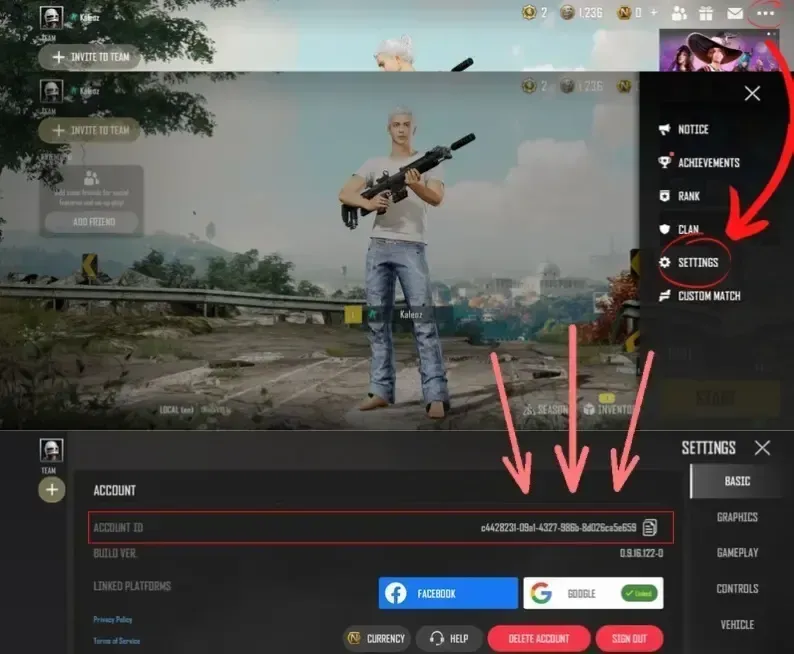
Log in to the game, then tap your avatar in the top left corner of the main screen. On the profile page, your User ID (Character ID) appears right below your profile, usually under your nickname. Copy the number exactly as it appears and paste it into the User ID field on the ItemGame page.
Tips
- Check your User ID twice before paying; NC sent to another account can’t be pulled back.
- Make sure you copy the numeric User ID, not your nickname.
- Pick an amount that fits what you need, for example just enough for the Survivor Pass or the crate you’re after.
- Keep your invoice number until the NC shows up in your account.
- If it hasn’t arrived after a few minutes, check your transaction history, then contact support with your invoice number.
Once the NC is in, you can go straight to the store and drop into your next match with a fresh look.
Why Top Up at ItemGame
- Automatic Process
- No Password Needed
- Local Payments
- Customer Support
How to find your User ID in New State Mobile:
- Open New State Mobile and log in to the account you want to top up.
- On the main screen, tap your avatar in the top left corner.
- Your profile page opens. Your User ID (Character ID) is shown as a string of numbers right below your profile.
- Copy or note down the number carefully, without spaces.
- Paste your User ID into the field on the ItemGame top-up page, then check every digit again before paying.
Make sure you enter the numeric User ID, not your nickname, because NC is sent to the User ID you enter and can’t be moved to another account.