Top Up OCTOPATH Traveler: CotC Rubies
About OCTOPATH Traveler: CotC
OCTOPATH Traveler: Champions of the Continent (CotC) is a mobile JRPG from Square Enix and a prequel to the console game. The signature HD-2D visuals, orchestral soundtrack and turn-based combat with the Break and Boost mechanics come to your phone intact, with a party of up to eight characters. To recruit new travelers through Guidance you need Rubies, and this page is where you add them to your account quickly, without having to log in.
What You Can Buy
This page offers Rubies top-ups for OCTOPATH Traveler: CotC Global accounts. The active amounts are listed at the top of the page, from small packs for everyday needs to large packs for players chasing a specific traveler banner. In the game, Rubies are used for Guidance to recruit new Travelers and to buy items that help you on your journey across the continent of Orsterra.
How to Top Up OCTOPATH Traveler: CotC on ItemGame
- Choose the Rubies amount you want from the item list.
- Enter your User ID in the field provided. The User ID is a string of numbers, not your player name.
- Select the Server from the dropdown. The current option is Global, the version played in Indonesia.
- Choose a payment method, such as QRIS, e-wallets, bank virtual account or retail outlets (Alfamart/Indomaret), then complete the payment. Rubies are sent automatically once the payment is confirmed.
How to Find Your User ID
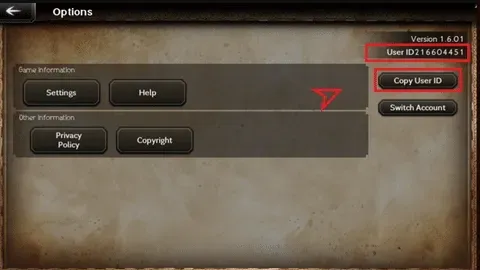
Open OCTOPATH Traveler: CotC, then tap the Options button on the main screen. On the Options screen, your User ID is shown in the top-right corner. Copy the number and paste it into the User ID field on ItemGame. If your screen looks slightly different, check the account settings menu; the User ID is usually shown there as well.
Tips
- Check your User ID twice before paying. Rubies that have gone to another account cannot be pulled back.
- Pick an amount that matches your goal. For a specific banner, work out how many Rubies you need in the game first.
- Keep your invoice number as proof of the transaction until the Rubies show up in your account.
- If the Rubies are not showing yet, close and reopen the game and check your gift box before contacting support.
- Never share your password or account transfer code with anyone.
Once your Rubies are in, you can go straight on to summoning your next traveler.
Why Top Up at ItemGame
- Automatic Process
- No Password Needed
- Local Payments
- Customer Support
How to find your OCTOPATH Traveler: CotC User ID:
- Open OCTOPATH Traveler: CotC and log in to the account you want to add Rubies to.
- On the main screen, tap the Options button.
- Look at the top-right corner of the Options screen. The string of numbers shown there is your User ID.
- Copy the number, then paste it into the User ID field on the ItemGame page.
- Select the Global server, then check your User ID again before tapping the pay button.
Use the numeric User ID, not your player name, because names can be shared between players while the ID is always unique. If you have more than one account, make sure the one you are logged in to is the account you want to top up.