Top Up Ragnarok Origin Nyan Berry via Secret Code
Ragnarok Origin, the True Successor to Ragnarok Online on Mobile
Ragnarok Origin (ROO) is a mobile MMORPG that brings back the feel of Ragnarok Online on PC, with upgraded graphics, the classic Job system, and community features such as Guild War. You explore Midgard, from Prontera to its iconic dungeons, together with other adventurers. This page is for players who want to top up Nyan Berry quickly using just their Secret Code, server, and account nickname, without logging in.
What You Can Buy
Nyan Berry is the premium currency of ROO, used for costume, headgear, and mount gacha, buying equipment and card upgrade items, and limited-time packs. The amounts available on ItemGame:
- 40, 125, 210, 430, and 900 Nyan Berry for small needs
- 2300, 4800, 9600, and 24000 Nyan Berry for mid-sized amounts
- 48000 and 96000 Nyan Berry for large packages
- Multiples of 4800 Nyan Berry: x5, x10, x15, x20, x25, x30, and up to x50 for players who want to top up a lot in one go
Choose an amount that matches your goal, for example one full gacha round or a specific limited-time pack.
How to Top Up Ragnarok Origin on ItemGame
- Choose the Nyan Berry amount you need.
- Enter your account’s Secret Code in the field provided.
- Select the Server your character plays on from the list (for example the Prontera or Izlude groups), then fill in your character’s Nickname exactly as it appears in the game.
- Choose a payment method, such as QRIS, e-wallets, bank virtual account, or cash at Alfamart or Indomaret, then complete the transaction. The Nyan Berry is processed automatically once the payment is confirmed.
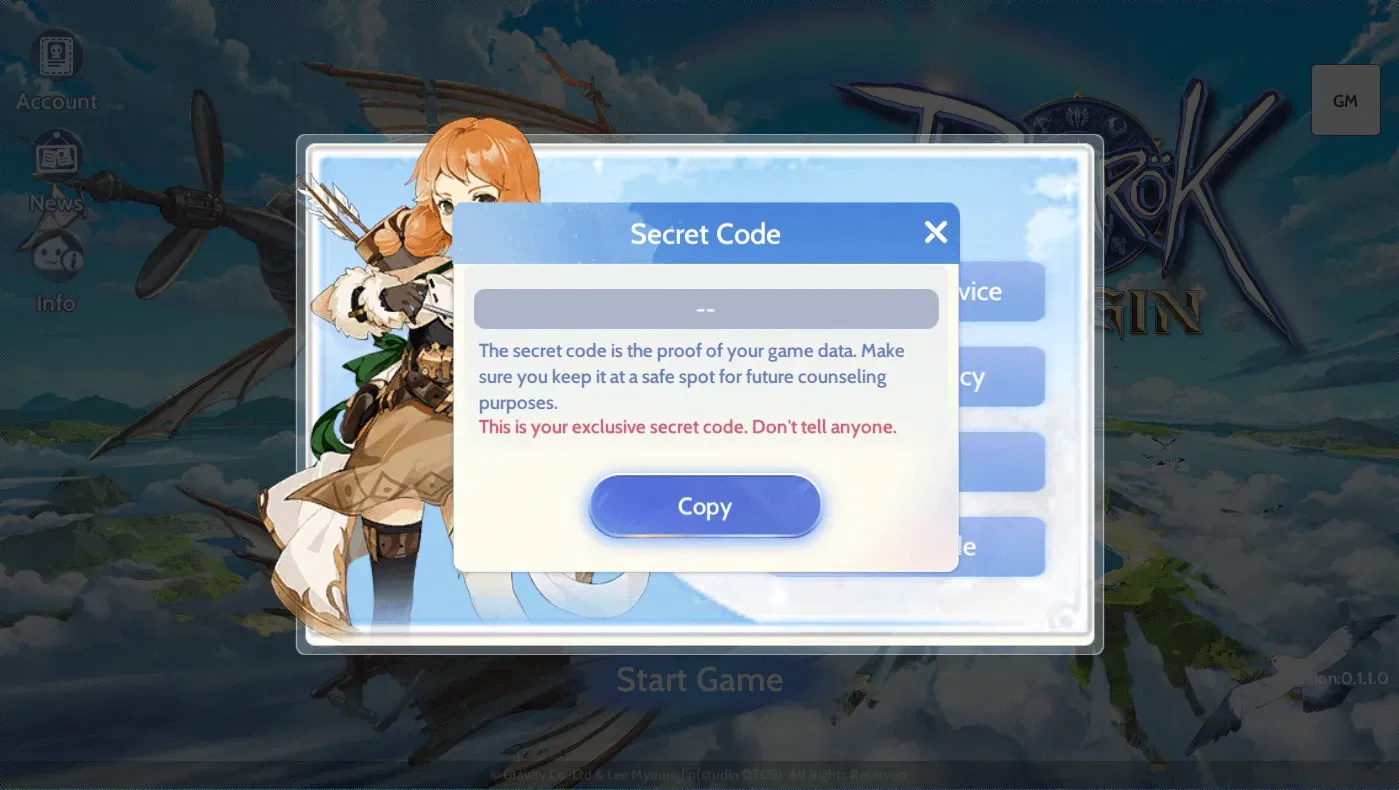
How to Find Your Secret Code
- Open Ragnarok Origin and go to the main screen.
- Tap the Reward icon in the top-right corner.
- Select the Secret Code menu.
- Copy the code that appears and paste it into the Secret Code field on ItemGame. You can see your server name and nickname on the character selection screen or your profile.
Tips
- All three details (Secret Code, server, nickname) must match each other; double-check everything before paying.
- Your nickname must be exactly the same as the one shown in the game, including uppercase and lowercase letters and symbols.
- Nyan Berry sent to another account cannot be reversed.
- Keep your invoice number until the Nyan Berry shows up in your account balance.
- If the Nyan Berry has not arrived after the payment is confirmed, check your transaction history on ItemGame, then contact customer support with your invoice number.
Nyan Berry top-ups on ItemGame run automatically 24/7, so you can top up any time before the next gacha event.
Why Top Up at ItemGame
- Automatic Process
- No Password Needed
- Local Payments
- Customer Support
How to find your Ragnarok Origin Secret Code:
- Open Ragnarok Origin and wait until you reach the main screen.
- Tap the Reward icon in the top-right corner of the screen.
- Select the Secret Code menu, then copy the code that appears.
- Paste the code into the Secret Code field on ItemGame.
- Select the same Server your character plays on, then fill in your character’s Nickname exactly as it appears in the game, including uppercase and lowercase letters and symbols.
All three details must match for the Nyan Berry to reach the right character. Nyan Berry sent to another account cannot be transferred.