Top Up NIKKE Gems and Monthly Pass with User ID
About Goddess of Victory: NIKKE
Goddess of Victory: NIKKE is a shooter RPG from Shift Up in which you are the Commander leading the Nikke, android fighters retaking the surface of Earth from the Rapture. One-handed cover shooting, detailed character animation and a dark story have made it popular across many regions. You need Gems to recruit new Nikke and buy items, and this page is where you top them up.
What You Can Buy
- Gems: with the bonus shown in the item name: 60 Gems + 1, 120 Gems + 3, 320 Gems + 10, 720 Gems + 120, 1500 Gems + 260, 2300 Gems + 400, 2370 Gems + 420, 4200 Gems + 1000 and 6200 Gems + 1500.
- Monthly Pass: Gems paid out daily while it is active.
In the game, Gems are used for recruitment, shop items and costumes for your favourite Nikke.
How to Top Up Goddess of Victory: NIKKE on ItemGame
- Enter your User ID and choose the server your account is on (SEA, Global, NA, JP or KR).
- Choose the item you want.
- Pay with the local e-wallets, QR and bank options available in your country.
- After the payment is confirmed, the order is processed automatically and delivered to your account.
How to Find Your User ID
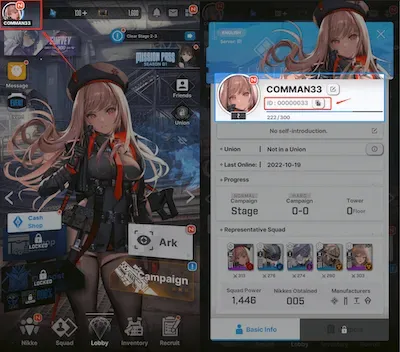
Open NIKKE, tap the box or menu icon in the top-right corner of the lobby and choose Notice. Your User ID is shown at the bottom of the Notice screen. Copy it into the User ID field on ItemGame. You can check your server name in the account settings; the server you pick on ItemGame must match it.
Tips
- Match your User ID and server twice before paying; Gems sent to another account or server cannot be moved back.
- For a limited banner, work out how many Gems you need in the game first.
- The Monthly Pass suits daily players; Gems packs suit one-off big purchases.
- Keep your invoice number until the item shows up in your account.
- If nothing has arrived after a few minutes, check your invoice page, then contact support with your invoice number.
Why Top Up at ItemGame
- Automatic Process
- No Password Needed
- Local Payments
- Customer Support
To find your NIKKE User ID:
- Open the game and go to the lobby.
- Tap the box or menu icon in the top-right corner.
- Choose Notice.
- Copy the User ID at the bottom of the screen and choose the matching server on ItemGame.