Top Up LifeAfter Credits with User ID and Server
About LifeAfter
LifeAfter is a survival MMORPG from NetEase Games set in a post-outbreak world full of Infected. You gather resources, craft weapons and gear, build your manor and survive together with your Camp against constant threats. It suits players who like open-world survival with long-term progress and teamwork. Credits are the premium currency for items in the Mall, costumes and other needs.
What You Can Buy
LifeAfter is sold as Credits packs: 65, 330, 558, 1108, 2268, 3468, 5768 and 7768 Credits. Credits go directly to the character that matches the User ID and server you choose, and can be used for Mall items, costumes, weapon skins, manor furniture and other offers according to the game’s rules.
How to Top Up LifeAfter on ItemGame
- Enter your User ID and choose your server from the list.
- Choose the item you want.
- Pay with the local e-wallets, QR and bank options available in your country.
- After the payment is confirmed, the order is processed automatically and delivered to your account.
How to Find Your User ID and server
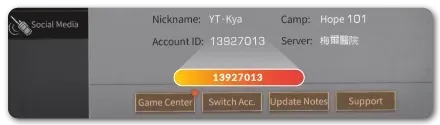
Open LifeAfter with the character you want to top up and tap the Settings (gear) icon in the top-right corner. Your account ID and server name are shown in that menu. Copy the ID into the User ID field on ItemGame, then choose the server with exactly the same name.
Tips
- Check your User ID and server twice; Credits delivered to another character or server cannot be moved back.
- Some server names look alike, so make sure the one you pick matches your account.
- Work out how many Credits the Mall item you want costs before choosing a pack.
- Keep your invoice number until the item shows up in your account.
- If nothing has arrived after a few minutes, check your invoice page, then contact support with your invoice number.
Why Top Up at ItemGame
- Automatic Process
- No Password Needed
- Local Payments
- Customer Support
To find your LifeAfter User ID and server:
- Open the game with the character you want to top up.
- Tap the Settings (gear) icon in the top-right corner.
- Note the account ID and server name.
- Enter the ID and choose the same server on ItemGame.