Top Up Honkai Impact 3rd Crystals and B-Chips
About Honkai Impact 3rd
Honkai Impact 3rd is a 3D action RPG from HoYoverse with fast hack-and-slash combat and a long sci-fi story. You are the Captain leading Valkyries in different battlesuits against the Honkai. It suits players who like combo and dodge based combat, character collecting and a deep storyline. Crystals are the premium currency for battlesuit, weapon and stigmata supplies, while B-Chips are top-up balance that can be exchanged for Crystals or used for certain shop offers.
What You Can Buy
- Crystals: 65, 330, 660, 1320, 3300 and 6600 Crystals.
- B-Chips: 30, 65, 330, 990, 1320, 1980, 3300 and 6600 B-Chips.
- Monthly Pass: the Monthly-Card, which gives Crystals daily while it is active.
Choose Crystals to add supply balance right away, B-Chips for more flexible shop balance, or the Monthly-Card if you log in regularly.
How to Top Up Honkai Impact 3rd on ItemGame
- Enter your User ID (UID).
- Choose the item you want.
- Pay with the local e-wallets, QR and bank options available in your country.
- After the payment is confirmed, the order is processed automatically and delivered to your account.
How to Find Your User ID (UID)
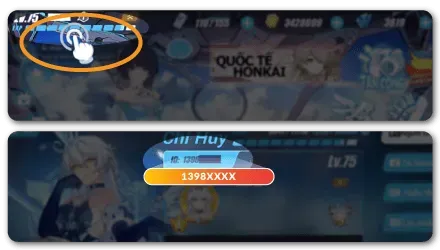
Open Honkai Impact 3rd and go to the bridge. Tap the bar with your level and Captain name in the top-left corner. On the profile page, your UID is the number next to your profile name. Copy it into the User ID field on ItemGame.
Tips
- Check your UID twice before paying; Crystals or B-Chips delivered to another account cannot be moved back.
- If you have accounts on more than one server, use the UID of the account you want to top up.
- With the Monthly-Card, log in every day so you do not miss the daily Crystals.
- Keep your invoice number until the item shows up in your account.
- If nothing has arrived after a few minutes, check your invoice page, then contact support with your invoice number.
Why Top Up at ItemGame
- Automatic Process
- No Password Needed
- Local Payments
- Customer Support
To find your Honkai Impact 3rd UID:
- Open the game and go to the bridge.
- Tap your level and Captain name in the top-left corner.
- Copy the UID next to your profile name.
- Paste it into ItemGame.