Top Up Ragnarok X: Next Generation Diamonds
About Ragnarok X: Next Generation
Ragnarok X: Next Generation (ROX) is a 3D mobile MMORPG licensed by Gravity that brings the world of Midgard back to life with new visuals. You can explore Prontera, hunt Porings, take up life skills such as fishing and cooking, collect monster cards for your equipment, and join the War of Emperium with your guild. To speed up your progress and buy premium items, ROX uses Diamonds, and this page is where you add them to your character.
What You Can Buy
Most items on this page are Diamonds in a very wide range of amounts, from 2310 and 2330 Diamonds, 4950 and 4990 Diamonds, 10290 and 10400 Diamonds, up to large packs such as 51370, 160540, 321090 and 963270 Diamonds. Some amounts are close to each other, so pick exactly the one shown on the page. There are also special packages called Hadiah Privilege W, Assurance of Exclusivity and Oath of Bond for players who want extra benefits, as described for each package in the game. In ROX, Diamonds are used to shop on the Exchange, refine equipment, buy costumes and mounts, and cover other premium needs.
How to Top Up Ragnarok X: Next Generation on ItemGame
- Choose the Diamonds amount or special package you want from the item list.
- Enter your character’s Role ID in the field provided. The Role ID is a string of numbers, not your character name.
- Select the Server your character is on from the dropdown, for example Valhalla, Majapahit or another server name as shown in the game.
- Choose a payment method, such as QRIS, e-wallets, bank virtual account or retail outlets (Alfamart/Indomaret), then complete the payment. Diamonds are sent automatically once the payment is confirmed.
How to Find Your Role ID and Server
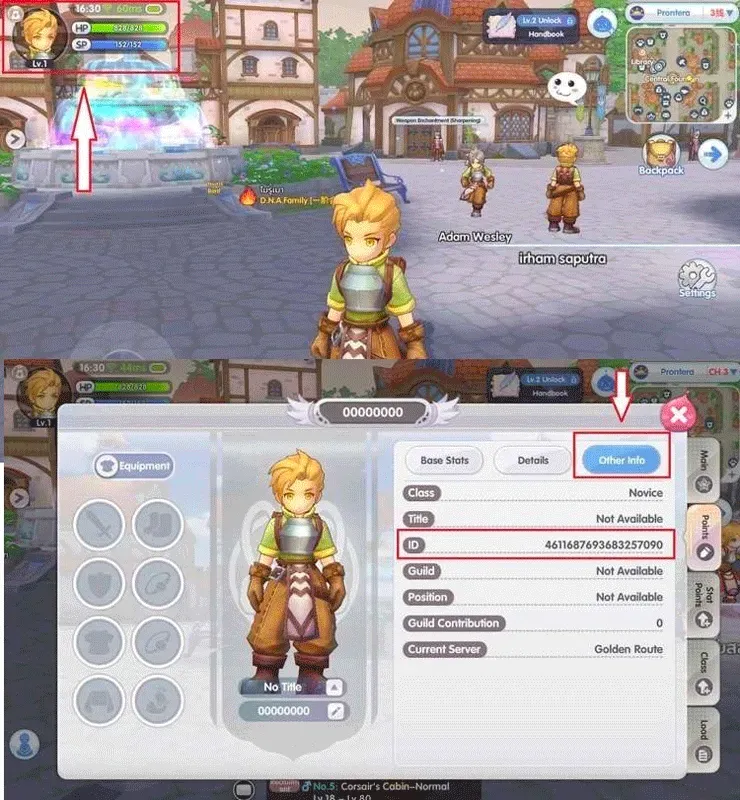
Open Ragnarok X, then tap your character avatar in the top-left corner of the main screen. Select Other Info, and your Role ID is listed on that page along with your character information. The server name is shown on the character selection screen when you log in, and usually on the same page as well. Copy your Role ID and select exactly the same Server on ItemGame.
Tips
- Match your Role ID and Server twice before paying. Diamonds sent to another character or server cannot be pulled back.
- Pay attention to amounts that are close to each other so you pick the package you actually want.
- Pick an amount that matches your goal, for example by checking how many Diamonds you need for the costume or refine you are after.
- Keep your invoice number as proof of the transaction until the Diamonds show up on your character.
- If they are not showing yet, close and reopen the game and check your mailbox before contacting support.
Once your Diamonds are in, you can carry on with your adventure in Midgard right away.
Why Top Up at ItemGame
- Automatic Process
- No Password Needed
- Local Payments
- Customer Support
How to find your Role ID and Server in Ragnarok X: Next Generation:
- Open Ragnarok X and log in with the character you want to add Diamonds to. Note the server name on the character selection screen.
- On the main screen, tap your character avatar in the top-left corner.
- Select Other Info. Your Role ID, a string of numbers, is listed on that page along with your character information.
- Copy the Role ID, then paste it into the Role ID field on the ItemGame page.
- Select the Server from the dropdown that exactly matches your character’s server name.
Check your Role ID and Server again before paying, because Diamonds only go to the character and server combination you entered.