Top Up Snowbreak: Containment Zone BitGold
About Snowbreak: Containment Zone
Snowbreak: Containment Zone is a sci-fi 3D shooter RPG you can play on mobile and PC with the same account. You are the Adjutant of the Heimdall Force leading Operatives against Titans and other threats inside the Containment Zone. Third-person shooting is combined with character skills, weapon customisation and large boss fights. You need BitGold to recruit new Operatives and weapons.
What You Can Buy
Every item is BitGold: 6, 30, 98, 198, 328 and 648 BitGold. Small amounts cover a shortfall, mid-range amounts suit chasing one banner, and large ones suit players who prefer one big top-up. In the game, BitGold is exchanged for the premium currency used for Echo pulls for Operatives and weapons, outfits and stamina refills.
How to Top Up Snowbreak: Containment Zone on ItemGame
- Enter your User ID and choose your server.
- Choose the item you want.
- Pay with the local e-wallets, QR and bank options available in your country.
- After the payment is confirmed, the order is processed automatically and delivered to your account.
How to Find Your User ID and server
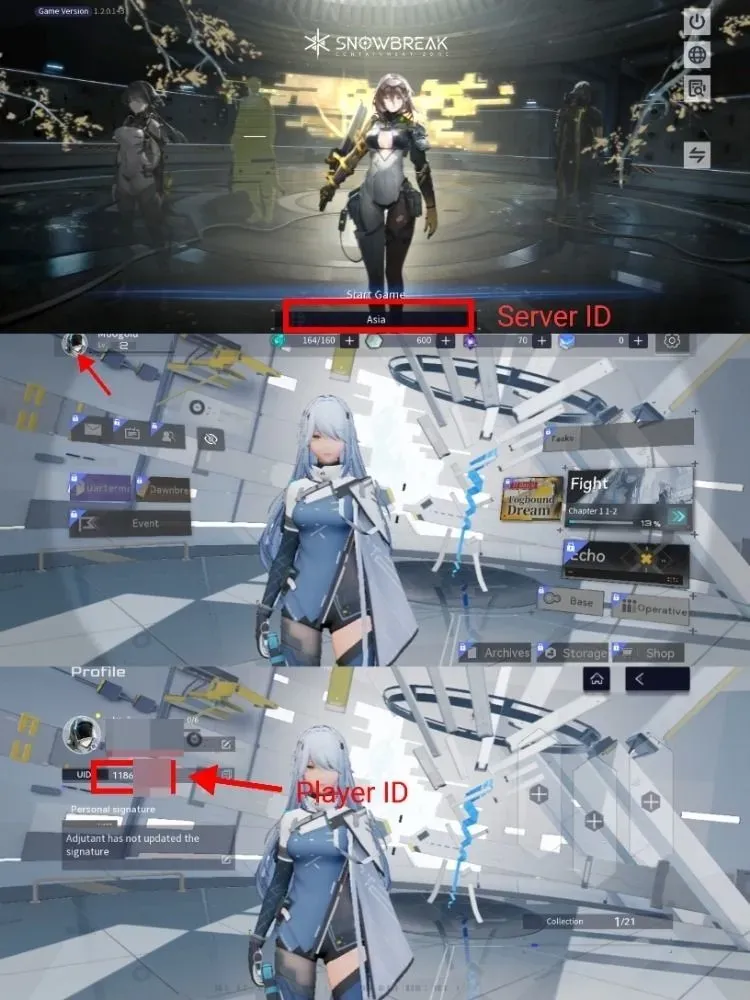
Open Snowbreak: Containment Zone and tap the profile menu in the top-left corner of the main screen. On the profile page, your User ID is the number under your nickname. Copy it into the User ID field on ItemGame. Your server name is on the same page or on the login screen.
Tips
- Match your User ID and server twice before paying; BitGold sent to another account or server cannot be moved back.
- For a specific banner, work out how much gacha currency you need first.
- If nothing has appeared, close and reopen the game and check your mailbox.
- Keep your invoice number until the item shows up in your account.
- If nothing has arrived after a few minutes, check your invoice page, then contact support with your invoice number.
Why Top Up at ItemGame
- Automatic Process
- No Password Needed
- Local Payments
- Customer Support
To find your Snowbreak User ID:
- Open the game.
- Tap the profile menu in the top-left corner.
- Copy the User ID under your nickname.
- Paste it into ItemGame and choose your server.