Top Up Tamashi: Rise of Yokai Sycee
About Tamashi: Rise of Yokai
Tamashi: Rise of Yokai is a Japanese fantasy mobile MMORPG that casts you as a yokai hunter in the land of Glamland. You collect Yokai and Tamashi partners to fight alongside you, take on bosses with a team, join a family and dress up your character with outfits and accessories. For gacha, outfits and shop items, the game uses a premium currency that is sold on this page in units of Sycee, and this is where you top it up to your account.
What You Can Buy
Every item on this page is Sycee, in amounts of 60, 300, 600, 900, 1200, 1800, 3000 and 6000 Sycee. Small amounts are good for topping up a shortfall, mid-range amounts for chasing one gacha banner or outfit, and large amounts for players who prefer to top up a lot in one go. In the game, the premium balance is used for Yokai and Tamashi gacha, buying key shop items that speed up your progress, and buying exclusive outfits and cosmetics.
How to Top Up Tamashi: Rise of Yokai on ItemGame
- Choose the Sycee amount you want from the item list.
- Enter your account’s User ID in the field provided. The User ID is a string of numbers, not your character name.
- Select the Server your character is on from the dropdown. Server names use a region code and number followed by a name, for example AP1-Kojiro for Asia-Pacific, or NA and EU for other regions.
- Choose a payment method, such as QRIS, e-wallets, bank virtual account or cash at Alfamart or Indomaret, then complete the payment. The Sycee is sent automatically once the payment is confirmed.
How to Find Your User ID and Server
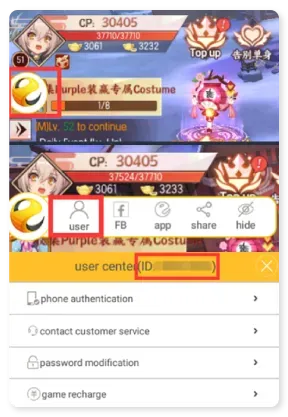
Open Tamashi: Rise of Yokai, then tap your profile avatar on the main screen. On the character info page, your User ID is shown as a string of numbers alongside your character details. The server name appears on the server selection screen when you log in and is usually shown on the same page too. Copy your User ID and select exactly the same Server on ItemGame.
Tips
- Match your User ID and Server twice before paying. Sycee sent to another character or server can’t be pulled back.
- Pay attention to the server prefix, AP, NA or EU, so you don’t pick a different server with a similar number.
- Pick an amount that fits your goal. For a particular gacha banner, work out how much you need in the game first.
- Keep your invoice number as proof of purchase until the Sycee shows up in your account.
- If it hasn’t appeared, close and reopen the game and check your in-game mailbox before contacting support.
Once the Sycee is in, you can get straight back to hunting yokai in Glamland.
Why Top Up at ItemGame
- Automatic Process
- No Password Needed
- Local Payments
- Customer Support
How to find your Tamashi: Rise of Yokai User ID and Server:
- Open Tamashi: Rise of Yokai and log in with the character you want to top up with Sycee. Note the server name on the server selection screen, for example AP1-Kojiro.
- On the main screen, tap your profile avatar.
- On the character info page, find the string of numbers that makes up your User ID, shown alongside your character details.
- Copy the number, then paste it into the User ID field on the ItemGame page.
- Select the Server from the dropdown that exactly matches your character’s server name.
Check your User ID and Server again before paying, because Sycee only goes to the account and server combination you enter.