Tarisland
About Tarisland
Tarisland is a cross-platform MMORPG from Tencent that you can play on PC and mobile with one account. You pick a classic class such as Warrior, Mage or Priest, explore a large world, and clear dungeons and raids with other players. The in-game shop focuses on cosmetics and convenience, which suits players who like skill-based progress and teamwork. Crystals are Tarisland’s premium currency for outfits, mounts and the Battle Pass. At ItemGame you top up with your User ID and server, without logging in.
What You Can Buy
- Crystals: 60, 330, 700, 1800, 3600 and 7250 Crystals.
- Weekly Pass: Weekly Ticket (7d), a membership with daily benefits for 7 days.
- Monthly Pass: Monthly Ticket (30d), a membership for 30 days.
- Ticket: Semiannual Ticket (180d), 180 days in one purchase.
The benefits of each Ticket are listed in the in-game shop. Everything is delivered to the character that matches your User ID and server.
How to Top Up Tarisland at ItemGame
- Enter your Tarisland User ID.
- Pick your server: ASIA-1, ASIA-2, ASIA-3, NA-1, LATAM-1, LATAM-2, EU-1, EU-2, EU-3 or EE-1.
- Choose Crystals or a Ticket, pick a payment method and pay.
- Once the payment is confirmed, the order is processed automatically. Check it in the game.
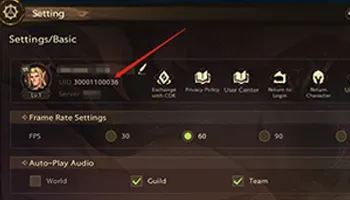
How to Find Your User ID
- Open Tarisland and go to the main menu with the character you want to top up.
- Tap the profile menu in the top-left corner.
- Your User ID is shown under the character name.
- Copy it into the User ID field at ItemGame and pick the matching server.
Tips
- Players in Southeast Asia are usually on an ASIA server, but always pick the server your character is on.
- If you have characters on several servers, choose the one you want to top up.
- For Weekly and Monthly Tickets, log in every day while they are active so you do not miss the daily benefits.
- Keep your invoice number until the order shows in your account.
Why Top Up at ItemGame
- Automatic processing: most orders are delivered within minutes of payment confirmation
- Prices in your local currency, with the final total shown before you pay
- Pay with the QR, e-wallet and bank options available in your country, through licensed payment partners
- Only the account details the order form asks for, never your game password
- Support over WhatsApp and email with your invoice number
How to find your Tarisland User ID:
- Open Tarisland and go to the main menu with the character you want to top up.
- Tap the profile menu in the top-left corner.
- Your User ID is shown under the character name as a string of numbers.
- Copy it into the User ID field at ItemGame without spaces.
- Pick the matching server, for example ASIA-1, ASIA-2 or ASIA-3 for Asia.
Items sent to another character or server cannot be moved, so check both before you pay.