Top Up Love and Deepspace Crystals, Hunter Number
About Love and Deepspace
Love and Deepspace is a 3D otome game from Infold Games set in a sci-fi world. As a Deepspace Hunter you fight mysterious creatures while building relationships with the male leads through personal first-person 3D cutscenes. Collecting memories and character cards drives both the story and your combat power. This page is for players who want to add Crystals to their account.
What You Can Buy
- Crystals: from 60 Crystals up to 6480 Crystals+1600 Diamonds. From 300 upward, the number after the plus is bonus Diamonds delivered with the pack.
- Aurum Pass (30 Days): rewards over the 30 days it is active.
- Companionship Pack: a bundle with several items in one purchase.
Crystals and Diamonds are generally used to wish for new memories, buy shop items and speed up progress.
How to Top Up Love and Deepspace on ItemGame
- Enter your Hunter Number in the User ID field.
- Choose the item you want.
- Pay with the local e-wallets, QR and bank options available in your country.
- After the payment is confirmed, the order is processed automatically and delivered to your account.
How to Find Your User ID (Hunter Number)
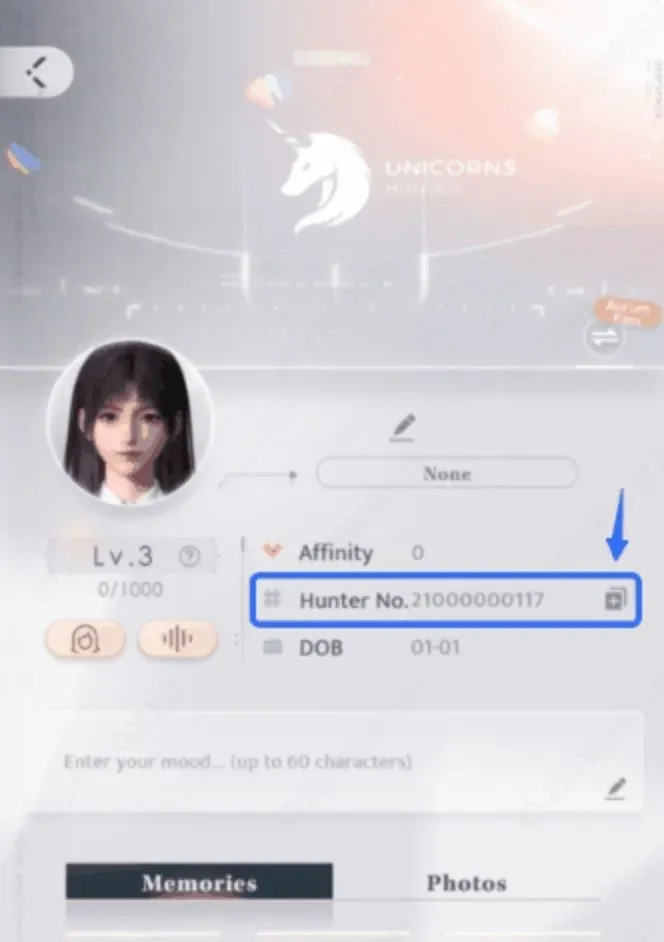
In Love and Deepspace, your User ID is your Hunter Number. On the main screen, tap the magnifying glass icon in the top-left corner. Your Hunter Number is shown there as a number. Copy it as it is into the User ID field on ItemGame.
Tips
- Check your Hunter Number twice before paying; items delivered to another account cannot be moved back.
- Copy the number, not your character name.
- If you log in every day, the Aurum Pass (30 Days) can be better value than buying Crystals repeatedly.
- Keep your invoice number until the item shows up in your account.
- If nothing has arrived after a few minutes, check your invoice page, then contact support with your invoice number.
Why Top Up at ItemGame
- Automatic Process
- No Password Needed
- Local Payments
- Customer Support
To find your Hunter Number:
- Open Love and Deepspace.
- On the main screen, tap the magnifying glass icon in the top-left corner.
- Copy the Hunter Number.
- Paste it into the User ID field on ItemGame.