Top Up LOTR: Rise to War Gems by User ID
About The Lord of the Rings: Rise to War
The Lord of the Rings: Rise to War is a seasonal strategy game from NetEase set in Middle-earth. You choose a faction such as Gondor, Rohan or Mordor, build your settlement, recruit iconic Commanders, then capture territory after territory with your alliance in pursuit of The One Ring. The map resets every season, so the competition always starts fresh. It suits players who enjoy large-scale war strategy with alliance coordination. Gems are the premium currency used to recruit Commanders, speed things up and buy from the store. On ItemGame, you only need your User ID and server to top up, with no account login.
What You Can Buy
The Lord of the Rings: Rise to War on ItemGame focuses on Gems, the premium currency you can use to:
- Recruit new Commanders or strengthen the ones you already have.
- Buy speed-up items for construction and troop training.
- Buy resources and other items in the in-game store.
The available Gems amounts are shown in the product list on this page. Gems are sent straight to the account that matches the User ID and server you choose.
How to Top Up The Lord of the Rings: Rise to War on ItemGame
- Enter your account’s User ID, a 9-digit number, in the field provided.
- Select your Server from the dropdown to match the server your account plays on, for example Server_1317, S2_0277 or S4_0512.
- Choose a Gems amount, then pick a payment method and complete the payment as instructed.
- Once the payment is confirmed, the Gems are processed automatically and added to your account. Check them in the game.
How to Find Your User ID
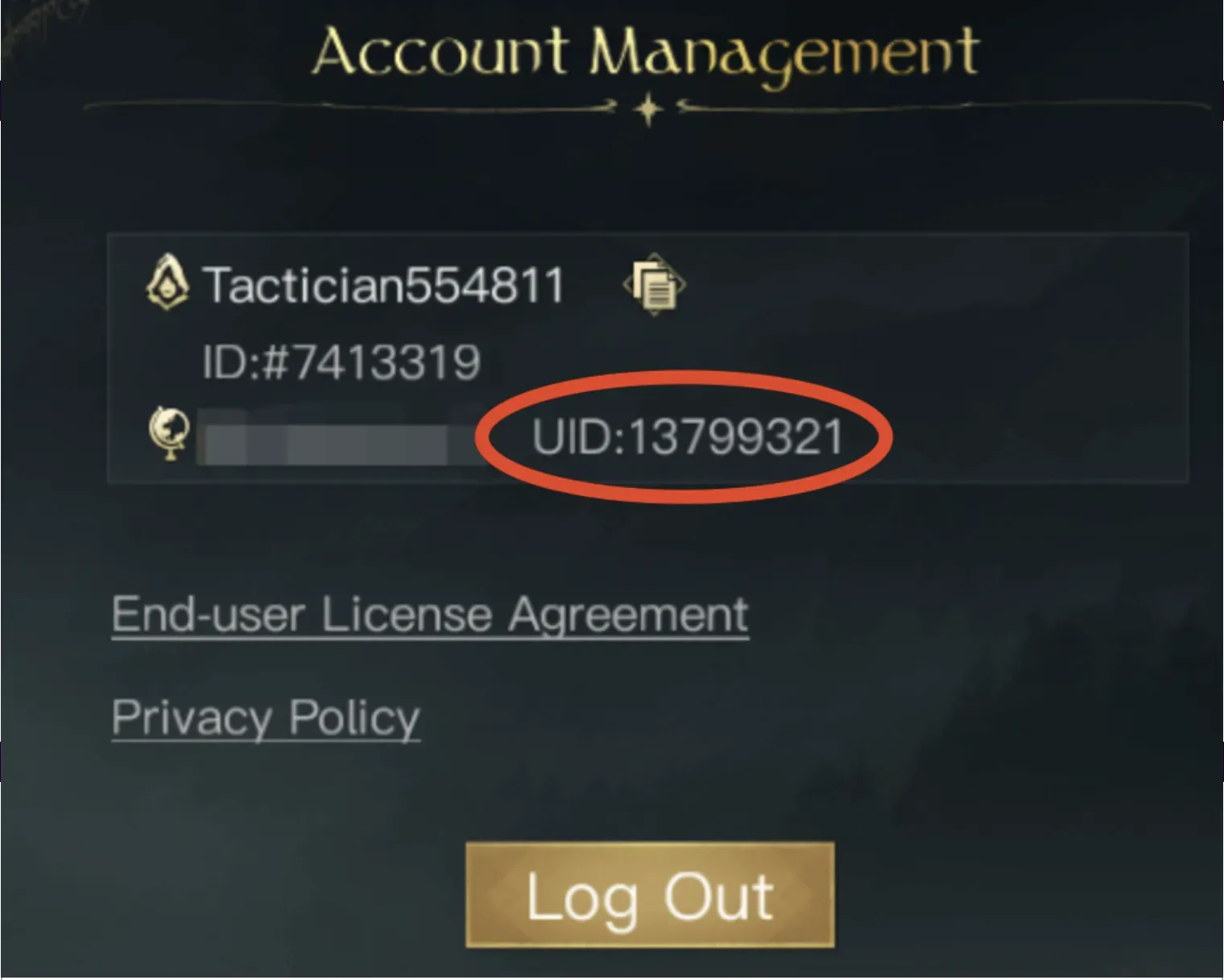
- Open The Lord of the Rings: Rise to War and go to the login screen.
- Open the account information in the top-left corner of the login screen.
- Your 9-digit User ID is shown there. Copy the number into the User ID field on ItemGame.
- Also note your account’s server name so you can select it in the dropdown.
Keep in mind that Guest accounts cannot be topped up. Link your account to an email or another platform first.
Tips
- Double-check your User ID and server before paying. Gems sent to another account or server cannot be pulled back.
- Make sure your account is not a Guest account so your order can be processed.
- Server names look similar to each other (Server_13xx, S2_02xx, S4_05xx); read them carefully before choosing.
- Keep your invoice number until the Gems show up in your account.
- If the Gems have not arrived after a few minutes, check the invoice page, then contact ItemGame support with your invoice number.
Top-ups are processed automatically 24/7, so you can get straight back to leading your army in Middle-earth.
Why Top Up at ItemGame
- Automatic Process
- No Password Needed
- Local Payments
- Customer Support
How to find your The Lord of the Rings: Rise to War User ID to top up on ItemGame:
- Open The Lord of the Rings: Rise to War and go to the login screen.
- Open the account information in the top-left corner of the login screen.
- Your User ID, a 9-digit number, is shown there. Copy it into the User ID field on ItemGame without spaces or extra characters.
- Note your account’s server name, then select the same server in the ItemGame dropdown.
Guest accounts cannot be topped up, so make sure your account is linked to an email or another platform. Check your User ID and server again before paying, because Gems sent to another account cannot be moved.