Top Up Soul Land: New World via User ID
About Soul Land: New World
Soul Land: New World is a mobile RPG adapted from the Douluo Dalu novels and animated series. You follow the journey of becoming a Soul Master: awakening your Martial Soul, hunting Soul Beasts to obtain Soul Rings, and collecting iconic characters from Shrek Academy to build your team formation. It suits fans of the series and players who enjoy character-collecting RPGs with tactical combat. The in-game premium currency is used to summon characters, buy materials, and grab special offers. On ItemGame, you top up with just your User ID, without logging in to your account.
What You Can Buy
Soul Land: New World products on ItemGame are premium currency packages and in-game offers, used to:
- Summon new high-rated Soul Masters.
- Buy upgrade materials, stamina, and other items in the shop to speed up your progress.
- Grab bundles and limited-time offers that appear during events.
The available amounts and packages are shown on this page. All items are sent directly to the account that matches the User ID you enter.
How to Top Up Soul Land: New World on ItemGame
- Enter your Soul Land: New World User ID in the field provided.
- Choose the package you want to buy.
- Choose a payment method, such as QRIS, e-wallets, bank virtual account, or cash at Alfamart or Indomaret, and complete the payment by following the instructions on the transaction page.
- Once the payment is confirmed, your order is processed automatically and added to your account. Check in the game, including your mailbox if the items are sent there.
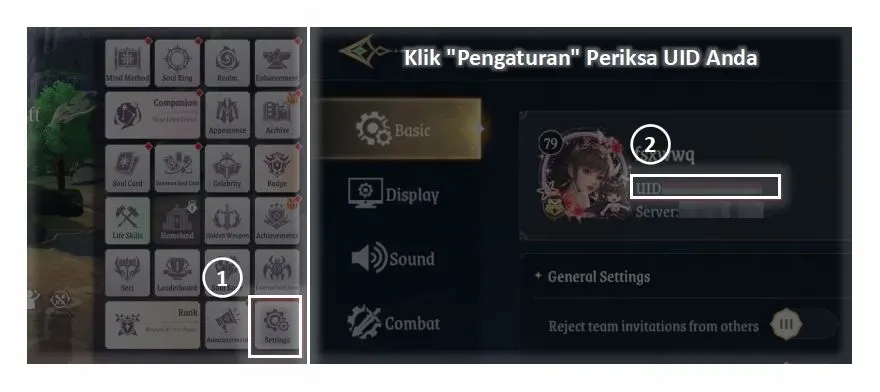
How to Find Your User ID
- Open Soul Land: New World and go to the main menu.
- Tap the profile menu, usually the avatar icon in the top-left corner.
- Your User ID is shown below your character name.
- Copy that number into the User ID field on ItemGame.
Tips
- Double-check your User ID before paying. Items sent to another account cannot be reversed.
- Choose a package that fits your needs, for example based on the summon or materials you are currently chasing.
- If you have several characters or servers, make sure the User ID belongs to the account you want to top up.
- Keep your invoice number until the items show up in your account.
- If the items have not arrived after a few minutes, check the invoice page, then contact ItemGame customer support with your invoice number.
Top-ups are processed automatically 24/7, so you can get straight back to training your Martial Soul without a long wait.
Why Top Up at ItemGame
- Automatic Process
- No Password Needed
- Local Payments
- Customer Support
How to find your Soul Land: New World User ID for top-ups on ItemGame:
- Open the Soul Land: New World app and wait until you reach the main menu.
- Tap the profile menu, usually the avatar icon in the top-left corner of the screen.
- Your User ID is shown below your character name as a string of numbers.
- Copy that number into the User ID field on ItemGame without any spaces or extra characters.
Check it again before paying, because items sent to another account cannot be transferred. If you play with more than one account, make sure the User ID belongs to the account you want to top up.