








Tips

League of Legends (LoL) is one of the world’s best-known 5v5 MOBA games, developed by Riot Games. Each player picks a Champion with its own skills and role, then works with teammates to destroy the enemy Nexus. The game combines deep strategy, individual skill and teamwork, so even after years of playing there is always something new to learn on Summoner’s Rift.
This ItemGame page lets you top up Riot Points (RP) directly to your LoL PC account. Please note: top-ups on this page only work for League of Legends accounts on the Thailand (TH) server. If your account is in another region, this is not the right page for you.
RP is the premium currency of League of Legends. It’s used to buy Champions, skins, chromas, emotes, ward skins and other cosmetic items in the in-game store. RP doesn’t make your Champions stronger in combat, but it lets you personalise your experience and make your favourite Champions look the way you want.
This page offers RP packs in several sizes, from small amounts up to large packs. See the item list on this page for all the options currently available.
Why Top Up at ItemGame
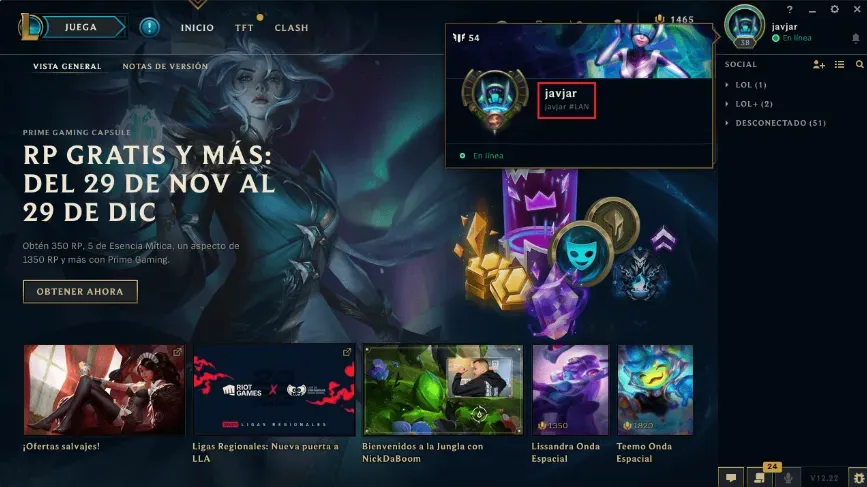
How to check your Riot ID: open the League of Legends PC client and log in to your account. In the top right corner of the screen you’ll see your profile picture or summoner icon. Hover your mouse over it and the client shows your full Riot ID, including the tagline after the # sign (for example: YourName#TH1). You can also click your profile to see it more clearly on the profile page.
Copy your full Riot ID exactly as shown, including the tagline. The name alone isn’t enough; both parts are needed to identify the right account. Also make sure your account is a Thailand-region account before ordering, because the RP on this page only works for Thailand-region accounts. Once you’re sure, paste your Riot ID into the Riot ID field on the order form and continue to payment.