






Tips

Delta Force is a tactical FPS from TiMi Studio Group that brings back the classic series with large-scale battles involving ground and air vehicles, plus an extraction mode that rewards teamwork and quick decisions. You choose Operators with different roles and tune your loadout to your play style. Delta Coins are the premium currency for the seasonal Battle Pass, Operators, weapon skins and other cosmetics. This page is for the Garena version that you play with a Garena account, not the Steam or global version.
Delta Coins packs with bonus coins included, from 18 + 1 and 30 + 2 Delta Coins up to 6480 + 1944, 12960 + 3888 and 19440 + 5832 Delta Coins. The first number is the base amount and the number after the plus sign is the bonus. Small packs are handy for topping up a shortfall; larger packs make sense if you are buying a pass and a bundle together.
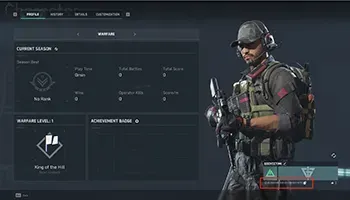
Open Delta Force and go to the profile or settings menu (gear icon). The User ID is shown on the profile or account information page, usually as a string of numbers under your account name. Copy it exactly, without spaces.
Why Top Up at ItemGame
To find your Delta Force User ID: