Top Up Call of Duty Mobile CP with Open ID
About Call of Duty: Mobile
Call of Duty: Mobile (CODM) is Activision’s mobile FPS, published in Indonesia by Garena. It has fast Multiplayer on classic Call of Duty maps, a large-scale Battle Royale mode and Gunsmith for building weapon attachments. CP (COD Points) is the premium currency for the premium Battle Pass, Lucky Draws and cosmetic bundles.
Important: to top up with an Open ID, your CODM account must already be linked (bound) to a Facebook account. Please do this before buying.
What You Can Buy
CP packs of 63, 128, 321, 645, 1373, 2060, 3564 and 7656 CP. CP goes straight to the account matching the Open ID you enter.
How to Top Up CODM on ItemGame
- Enter your Open ID.
- Choose a CP amount.
- Pick a payment method and pay.
- After the payment is confirmed, the CP is processed automatically. Restart the game to see the new balance.
How to Find Your Open ID
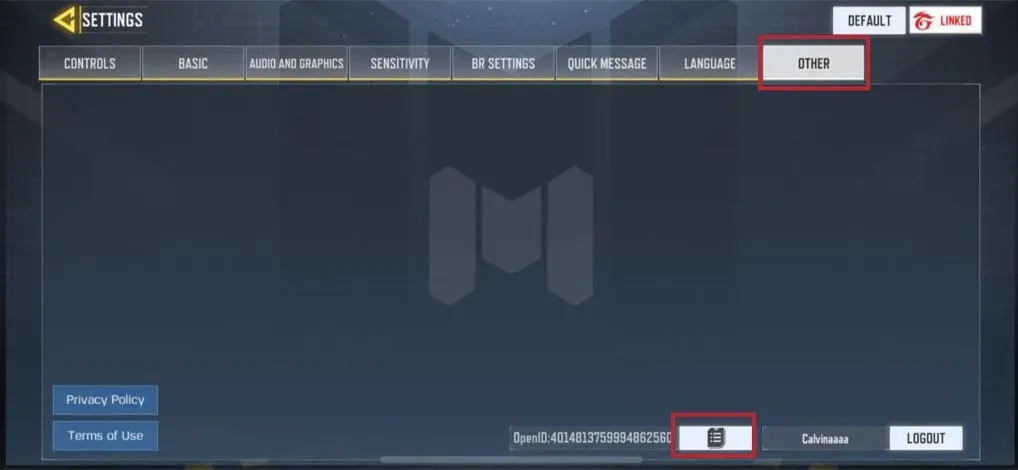
Open Call of Duty: Mobile, tap the Settings (gear) icon, scroll down and choose Legal & Privacy. Your Open ID is shown at the top of that page.
Tips
- Link your account to Facebook first, or the top-up cannot be delivered.
- Copy the Open ID rather than typing it.
- Keep your invoice number until the CP appears.
Why Top Up at ItemGame
- Automatic processing: most orders are delivered within minutes of payment confirmation
- Prices in your local currency, with the final total shown before you pay
- Pay with the QR, e-wallet and bank options available in your country, through licensed payment partners
- Only the account details the order form asks for, never your game password
- Support over WhatsApp and email with your invoice number
To find your CODM Open ID:
- Open Call of Duty: Mobile and go to the main screen.
- Tap the Settings (gear) icon.
- Scroll down and choose Legal & Privacy.
- Copy the Open ID shown at the top and paste it into ItemGame.
Make sure the account is linked to Facebook before paying.