Top Up ONE PUNCH MAN: The Strongest
About ONE PUNCH MAN: The Strongest
ONE PUNCH MAN: The Strongest is a turn-based mobile RPG based on the One Punch Man anime and manga. You collect iconic heroes and villains such as Saitama, Genos and other members of the Hero Association, then build formations for tactical battles across various modes. It’s a good fit for fans of the series and for players who enjoy character-collecting games with team strategy. On ItemGame, you can top up premium items for ONE PUNCH MAN: The Strongest with just your User ID and Server ID, no account login needed.
What You Can Buy
ONE PUNCH MAN: The Strongest products on ItemGame are premium currency packs and in-game offers, used to:
- Recruit new characters through the summon system.
- Buy items in the Mall, such as upgrade materials and resources to strengthen your team.
- Grab special offers that appear in the in-game shop.
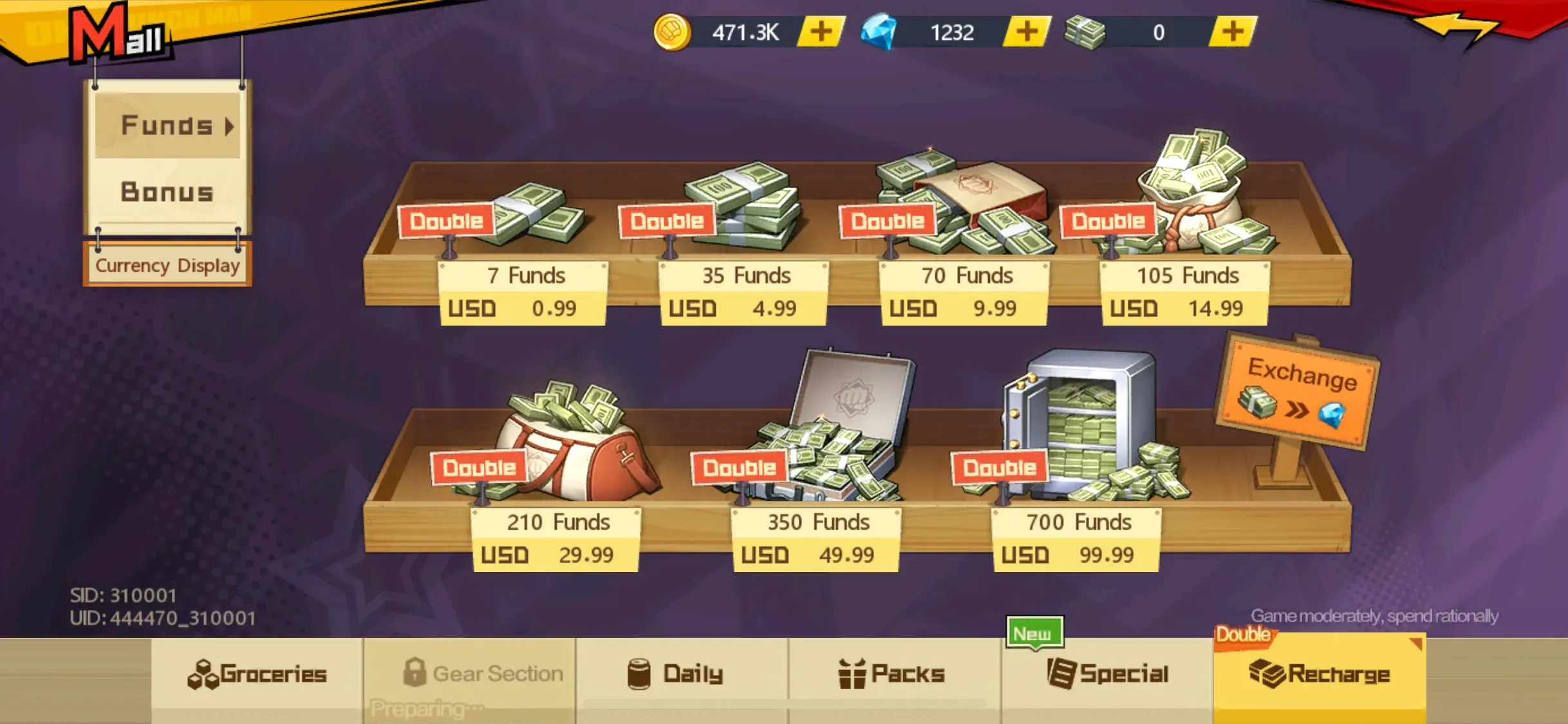
The available amounts and packs are listed on this page. All items are delivered straight to the account matching the User ID and Server ID you enter.
How to Top Up ONE PUNCH MAN: The Strongest on ItemGame
- Enter your account’s User ID (UID) in the field provided.
- Enter the Server ID (SID) your character plays on.
- Choose the pack you want, pick a payment method, such as QRIS, e-wallets (DANA, OVO, ShopeePay, LinkAja), a bank virtual account or cash at Alfamart or Indomaret, and complete the payment following the instructions.
- Once the payment is confirmed, your order is processed automatically and delivered to your account. Check in the game, including your mailbox in case the items are sent there.
How to Find Your User ID and Server ID
- Open ONE PUNCH MAN: The Strongest and go to the Main City.
- Tap the Mall in the Main City area.
- Tap the Top up button. In the Top up window, your SID (Server ID) and UID (User ID) are shown in the bottom-left corner.
- Copy the UID into the User ID field and the SID into the Server ID field on ItemGame.
Tips
- Double-check your User ID and Server ID before paying. Items that land in another account or server can’t be pulled back.
- Don’t mix up UID and SID; UID is your account ID, SID is your server number.
- Pick a pack that fits your needs, for example your summon target or the Mall item you’re after.
- Keep your invoice number until the items show up in your account.
- If your items haven’t arrived after a few minutes, check the invoice page, then contact ItemGame support with your invoice number.
Top-ups run automatically 24/7, so you can get straight back to powering up your hero team.
Why Top Up at ItemGame
- Automatic Process
- No Password Needed
- Local Payments
- Customer Support
How to find your User ID (UID) and Server ID (SID) in ONE PUNCH MAN: The Strongest for a top-up on ItemGame:
- Open ONE PUNCH MAN: The Strongest and go to the Main City.
- Tap the Mall in the Main City area.
- Tap the Top up button. In the Top up window that opens, your SID and UID are shown in the bottom-left corner.
- Copy the UID into the User ID field and the SID into the Server ID field on ItemGame, without spaces or extra characters.
Don’t mix them up: UID is your account ID, SID is your server number. Check both again before paying, because items sent to another account or server can’t be moved.