Top Up Age of Empires Mobile by User ID
About Age of Empires Mobile
Age of Empires Mobile is the mobile adaptation of the legendary Age of Empires strategy series. You build a city, manage resources, recruit historical commanders and fight other players on the same server in real time. It suits strategy fans who enjoy the long game: running an economy, working with an alliance and leading large-scale battles. To move faster, you can top up premium currency right here on this page.
What You Can Buy
This page offers top-up items for Age of Empires Mobile accounts, mainly the premium currency used in the game to speed up construction and research, buy resources on the spot, and recruit and develop commanders. The active amounts and packs are always shown at the top of the page, so you can pick what fits, whether that’s a small everyday top-up or a big pack for an event push.
How to Top Up Age of Empires Mobile on ItemGame
- Choose an amount or pack from the item list.
- Enter your account’s User ID in the field provided.
- Select the Server your character plays on from the dropdown, for example a Realm, Kingdom or Empire that matches your server number.
- Choose a payment method, such as QRIS, e-wallets (DANA, OVO, ShopeePay, LinkAja), a bank virtual account or cash at Alfamart or Indomaret, then complete the payment. Your items are processed automatically once the payment is confirmed.
How to Find Your User ID and Server
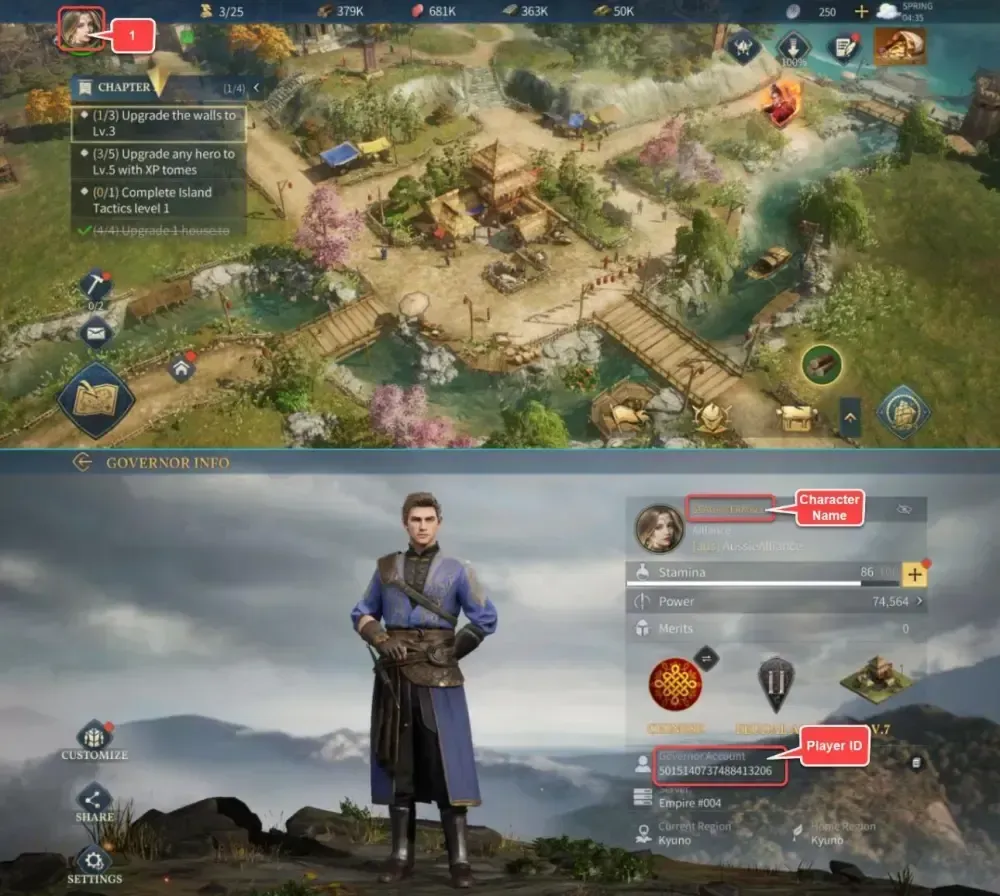
Open Age of Empires Mobile and tap your profile avatar in the top-left corner of the main screen. On the profile page, your User ID is shown under your character name. The server name and number are usually on the same page, or on the main screen near your city name. Make sure the Server you select on ItemGame matches your account’s server exactly, because one User ID can have characters on different servers.
Tips
- Double-check your User ID and Server before paying. The wrong server means the items go to a different character.
- Pick an amount that fits your goal. If you’re chasing a specific event, work out how much currency you need in the game first.
- Save your invoice number after paying as proof of the transaction.
- If the items don’t show up yet, close and reopen the game, then check your mailbox or your balance in the shop menu.
- If they still haven’t arrived, contact support with your invoice number so the order can be checked quickly.
Once your balance is in, you can get straight back to building your empire.
Why Top Up at ItemGame
- Automatic Process
- No Password Needed
- Local Payments
- Customer Support
How to find your Age of Empires Mobile User ID and Server:
- Open the game and log in to the account you want to top up.
- On the main screen, tap your profile avatar in the top-left corner.
- On the profile page, look for the string of numbers under your character name. That’s your User ID. Copy it so no digits get mixed up.
- Also note your server name, for example Realm, Kingdom or Empire followed by a number. It’s usually shown on the profile page or on the main screen near your city name.
- On the ItemGame page, paste your User ID into the field and select exactly the same Server from the dropdown.
Check both again before paying, because the items only go to the User ID and Server combination you entered.