Top Up State of Survival Diamonds with User ID
About State of Survival
State of Survival is a mobile survival strategy game set in a zombie apocalypse. You build and manage a settlement, rescue survivors, recruit heroes, train troops and join an Alliance to face infected hordes and other players on the world map. It suits players who enjoy base-building, resource management and long-term alliance wars.
What You Can Buy
State of Survival is sold as Diamonds packs: 100, 500, 1,000, 2,000, 5,000, 10,000 and 20,000 Diamonds. They go straight to the account matching your User ID and are used for premium needs such as speeding up construction and training, recruiting heroes or buying resources in the shop.
How to Top Up State of Survival on ItemGame
- Enter the User ID of your State of Survival account.
- Choose the item you want.
- Pay with the local e-wallets, QR and bank options available in your country.
- After the payment is confirmed, the order is processed automatically and delivered to your account.
How to Find Your User ID
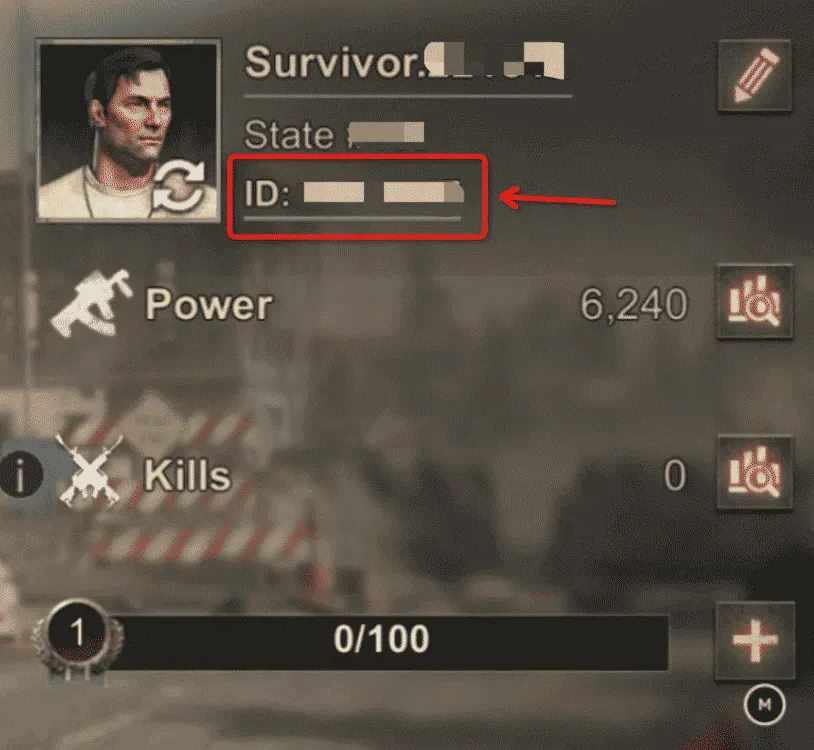
Open State of Survival and go to your settlement. Tap your profile avatar in the top-left corner and open Settings; your User ID is shown there. Copy the number into the User ID field on ItemGame.
Tips
- Check your User ID twice before paying; items delivered to another account cannot be moved back.
- If you have settlements in more than one state or account, use the ID of the one you want to top up.
- Match the amount to your goal, such as speed-ups during a building event.
- Keep your invoice number until the item shows up in your account.
- If nothing has arrived after a few minutes, check your invoice page, then contact support with your invoice number.
Why Top Up at ItemGame
- Automatic Process
- No Password Needed
- Local Payments
- Customer Support
To find your State of Survival User ID:
- Open the game and go to your settlement.
- Tap your profile avatar in the top-left corner.
- Open Settings.
- Copy the User ID into ItemGame.