









Top Up Valorant VP Malaysia (MY) with Riot ID
Valorant for Malaysia Accounts
This page is only for Valorant accounts registered in the Malaysia (MY) region. VP bought here cannot be delivered to accounts in other regions.
Valorant is Riot Games’ free-to-play 5v5 tactical shooter. Teams take turns attacking and defending to plant or defuse the Spike, and every Agent has a unique set of abilities. All Agents and weapons can be unlocked without paying; Valorant Points (VP) are used for weapon skins and bundles in the Store, the Battle Pass each Act, and Gun Buddies, Player Cards and Sprays.
What You Can Buy
VP in 475, 1000, 2050, 3650, 5350 and 11000 VP.
How to Top Up
- Enter your Riot ID, including the tagline, for example PlayerName#1234.
- Choose a VP amount.
- Pay with one of the methods shown at checkout. The list depends on the store you shop in: in Indonesia you pay in rupiah with QRIS, e-wallets, bank virtual accounts or retail outlets, among others. In Malaysia the options include DuitNow QR, an e-wallet such as Touch ‘n Go eWallet, Boost, GrabPay or ShopeePay, or cash at 7-Eleven.
- After the payment is confirmed, the VP is sent to your account automatically.
How to Find Your Riot ID
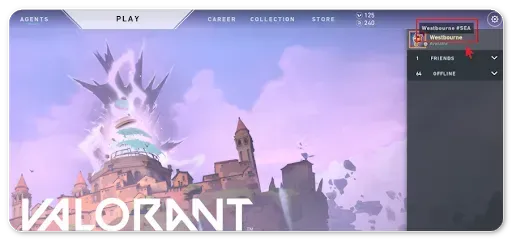
Open Valorant and hover over your name in the top-right corner of the client. Your Riot ID is shown as Name#Tagline. You can also see it on your Riot account page in a browser. Enter both the name and the tagline, including the # sign.
Tips
- Make sure your Riot account region is Malaysia.
- Always include the # and tagline.
- Check the VP price of the item you want in the Store first.
Why Top Up at ItemGame
- Automatic Process
- No Password Needed
- Local Payments
- Customer Support
To find your Riot ID:
- Open the Valorant client.
- Hover over your profile name in the top-right corner.
- Your Riot ID appears as Name#Tagline, for example PlayerName#1234.
- Enter the full ID, including the # and the tagline, on ItemGame.
Without the tagline the account cannot be identified.