Top Up Legends of Runeterra Coins (TH)
Legends of Runeterra (TH): Coins for Thai Server Accounts
Legends of Runeterra (LoR) is a strategy card game from Riot Games set in the League of Legends universe. In LoR you build decks from champions and followers from different regions of Runeterra, such as Demacia, Noxus, Ionia and Piltover & Zaun. The goal is to use strategy, planning and a little luck to bring your opponent’s Nexus down to zero. If you like card games that reward thinking over fast fingers, LoR could be the game for you.
This ItemGame page lets you top up Coins directly to your LoR account. Please note: top-ups on this page only work for Legends of Runeterra accounts on the Thailand (TH) server. If your account is registered in another region, this isn’t the right page for you.
What Are Coins in Legends of Runeterra?
Coins are LoR’s premium currency. You use them to buy cards and wildcards to complete your decks faster, plus cosmetics such as boards, guardians, card backs and emotes. You don’t need Coins to win, but they help a lot if you want to try a new deck idea right away or give the game your own look.
This page offers Coins packs in several sizes, from small to large. See the item list on this page for all the options currently available.
How to Top Up LoR Coins (TH) on ItemGame
- Choose your Coins amount. Pick the pack you want from the item list.
- Enter your Riot ID. Type your full Riot ID, both the name and the tagline (for example: YourName#TH1). Check the spelling carefully.
- Choose a payment method. Pay with one of the methods shown at checkout. The list depends on the store you shop in: in Indonesia you pay in rupiah with QRIS, e-wallets, bank virtual accounts or retail outlets, among others. In Thailand the options include Rabbit LINE Pay.
- Complete the payment. Follow the steps on the payment page until the payment is confirmed.
- Done. Once the system confirms your payment, the Coins are sent to your LoR account, usually within a few minutes.
Why Top Up on ItemGame
- No login required. We only ask for your Riot ID, never your Riot account password.
- Pay in your store’s currency. Prices are shown in the currency of the store you shop in, for example rupiah in Indonesia or baht in Thailand.
- Local payment channels. The methods shown at checkout depend on the store you shop in, for example QRIS and e-wallets in Indonesia or Rabbit LINE Pay in Thailand.
- Support team on hand. If something goes wrong with your order, contact us with your invoice number.
Tips Before You Top Up
- Double-check your Riot ID and tagline in the LoR client before paying. Coins sent to the wrong account can’t be pulled back.
- Make sure your account is on the TH server, because Coins bought on this page only work on the Thailand server.
- Keep your invoice number after paying so you can track your order easily.
Why Top Up at ItemGame
- Automatic Process
- No Password Needed
- Local Payments
- Customer Support
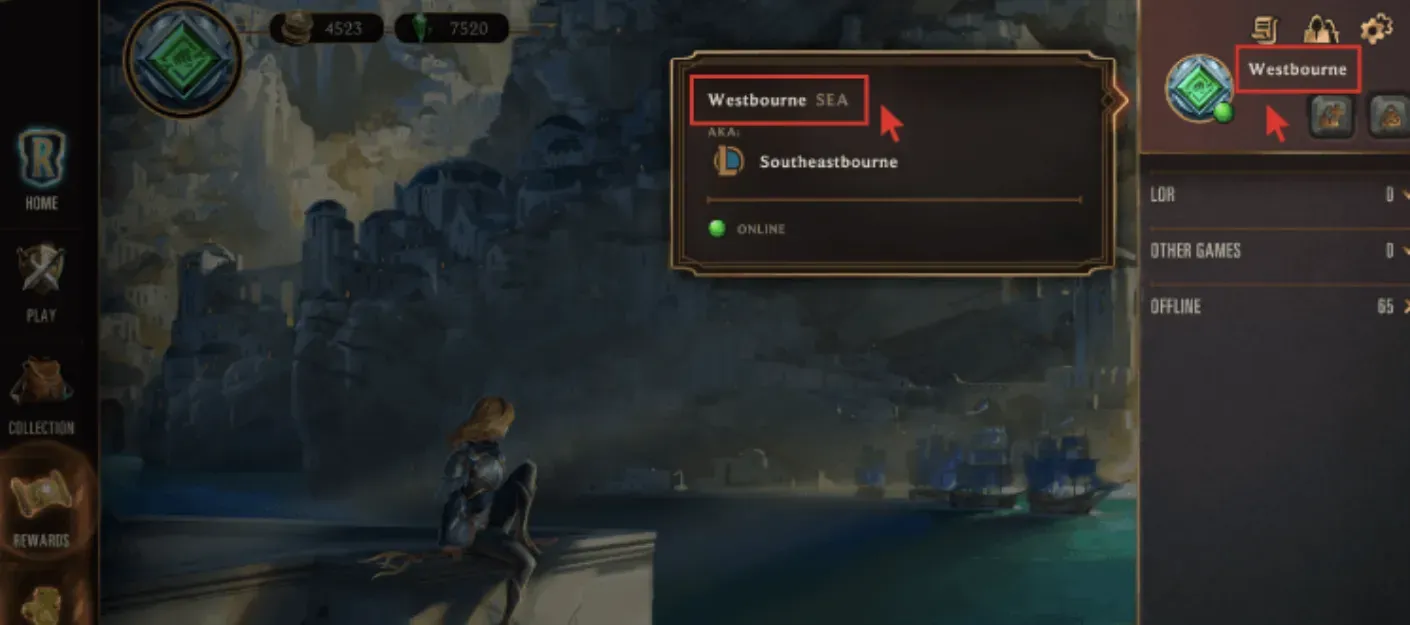
How to find your Riot ID: open the Legends of Runeterra client and log in to your account. Your profile picture is in the top-right corner of the screen. Hover your mouse over it (or tap it if you play on mobile) and the client shows your full Riot ID, with the tagline after the # sign (for example: YourName#TH1).
Copy the whole Riot ID exactly as shown, including the tagline. The name alone isn’t enough; both parts are needed to identify your account correctly. Also make sure your account is on the TH server before ordering, because the Coins on this page only work on the Thailand server. Once you’re sure, paste the Riot ID into the Riot ID field on the order form and continue to payment.